Did you know that you can make your tanks have a manual transmission? By default your tank will use an automatic transmission, however you can make your tank have a manual transmission. Automatic manages shifting for ease of play, while Manual mode provides precise control over engine RPMs, gear selection, and neutral steering—ideal for steep climbs and stabilized combat. It’s one more thing to do during the heat of a battle, but can be worth the reward.
The Benefits of Manual vs Automatic
Manual
- Precise speed control: giving you the ability to go the speed you want and not just as fast as possible
- Precise torque control: lower gears will have higher torque (power) letting you for example; climb a hill easier
Automatic
- Ease of use: it’s basic and simple to use and learn
- Less to think and do about in the heat of battle
- Has Cruise Control
- Can accelerate faster*
*you may find that you can accelerate faster manually than the automatic with practice.
Automatic Mode
The automatic transmission mode is the default. its simple to use and learn. It takes no new skill set or key binds: Press forward to go forward, press backward to go backward etc.
Cruise Control
Cruise Control (CC) is handy little feature that the automatic mode has. CC is a driver-assistance system that automatically locks your speed at specific intervals. By eliminating the need to hold down a movement key, allowing you to easily maintain a steady speed and/or angle. The default keys for this are 'E' for CC forward and 'Q' for CC backward. This is indicated in the bottom left HUD in-between the GEAR and the RPM.
There are 4 settings for CC and off, which is not indicated. From lowest to highest they are shown as 'CC R', off, 'CC 1', 'CC 2', 'CC MAX'. 'CC R' is the setting for reversing, and 'CC MAX' is as fast as possible.
Some tanks have gun stabilizers that are only effective up to a certain speed. In these cases, there is often also a 'CC BATTLE' setting, which will set the CC to the maximum speed the vehicle can travel before the stabilizer disengages.
How to change to a Manual:
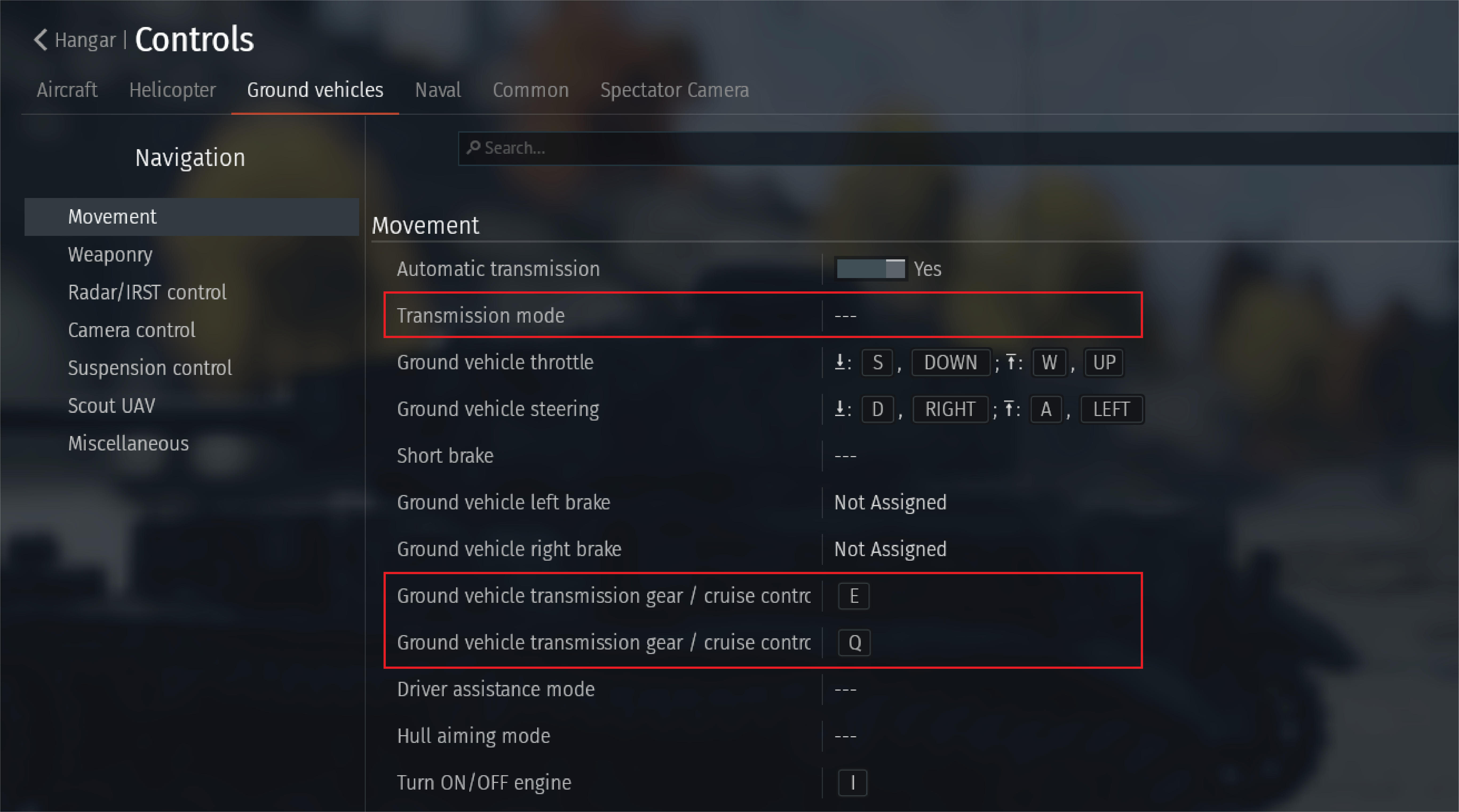
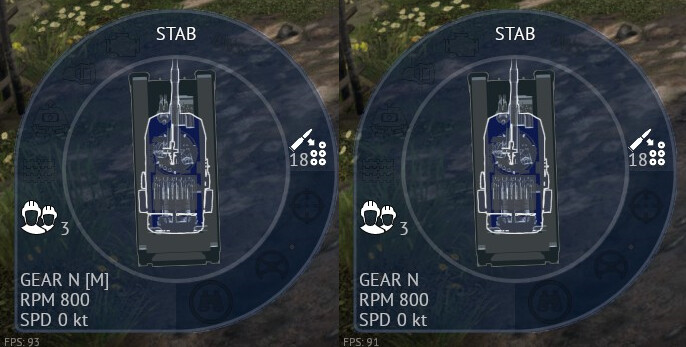
To switch to manual transmission controls, simply go to Menu -> Controls -> Ground vehicles -> Movement -> Transmission mode, then bind a key to it. The button that is bound to the 'Transmission mode' will toggle between automatic and manual. This is indicated by a '[M]' appearing on the HUD after the gear.
How to drive a Manual:
Firstly, the information in the HUD in the bottom left is very important to driving your manual transmission. Notice in the above photo the GEAR, RPM, and SPD in the HUD.
- GEAR: shows what gear your currently in (in photo current gear is N)
- RPM: number of Revolutions Per Minute that your engine doing
- SPD: your current speed with Measurement unit; in this case, knots (units of measurement can be changes in options menu)
Different kinds of gears
The exact gears are different for vehicle to vehicle, but they should all have the following.
- A neutral gear: denoted by a N in HUD
- A forward gear 1: denoted by a 1 in HUD
- A forward gear 2: denoted by a 2 in HUD
- A reverse gear 1: denoted by a R1 in HUD
There can be more then 2 forward gears and more then 1 reverse gear depending on the specific vehicle, but there will only be one neutral gear. The neutral gear is a gear that cannot move the vehicle, the forward and reverse gears move the tank forward and backward respectively. For example, on a vehicle that has 7 forward gears and 2 reverse gears the sequence from bottom to top would go as such: R2, R1, N, 1, 2, 3, 4, 5, 6, 7.
Key Changes
The Manual Transmission in War Thunder works as a paddle shifter, the 2 buttons bound to the 'Ground vehicle transmission gear / cruise control' and 'Ground vehicle transmission gear / cruise control' shift the gears up or down. The buttons are by default Q for downshift and E for upshift on PC. Looking at the example for above: if the transmission is on “N” then 2 presses of E would put the transmission into “2”, and then from the 4 presses of Q would put the transmission to the “R2” gear.
The “Ground Vehicle Throttle Up” key (W by default) now works as an accelerator, and will move the vehicle according the the current gear. If in a forward gear the vehicle will move forward, conversely if in a reverse gear the vehicle will move backward.
The “Ground Vehicle Throttle Down” key (S by default) now works as a brake, and will stop the movement of the vehicle as fast as it can, not all of the vehicle brakes are the same.
Driving
To drive forward, put the transmission in to the first gear and hold the accelerator. once your RPMs rise and then plateau, shift to the second gear, the RPMs should drop slightly and then rebound. Next shift to third and continue this process until you are at your highest gear.
To stop press and hold the brake until you stop.
To drive backwards, put the transmission into reverse gear 1 and hold the accelerator; if your vehicle has one, shift into the second reverse gear.
When/How to use in battle
- If you need to climb a hill and your tank can’t in automatic, switch to the Manual and then shift into the 1st gear. This will slow you down, giving you more torque (power) and the best chance to climb that hill
- If you need to go down a hill without going super fast and possibly damaging your vehicle: switch to the Manual and shift to a low gear, 1st or 2nd gear would work, then drive down the hill
- If you need to slowly peek out of cover so you have control: shift to 1st gear (or R1 if you need to peak backwards) then accelerate out with precise control. As you line up your shot, shift into R1 (or 1st gear if you did it backward) so that you are ready to return to cover when you fire. Then shoot (and get that sweet “target destroyed”) and accelerate back into hiding and do it all again when you reload
- To flex on the other players in chat
Tips
- Practice in the test drive before going on a mission using it
- Bind the toggle on/off button for it in an easy to reach place because then you can get all the benefits with none of the drawbacks